Constructionism in the Classroom

Constructionism in the classroom encourages and fosters student creativity and allows students to create and innovate. Constructionism is a pedagogical practice that can help students develop a large range of 21st century skills, they include, creativity, problem solving, critical thinking, inquiry, design thinking, collaboration, autonomy, literacy, numeracy, scientific understanding, digital literacy, communication, reflective learning capabilities and resilience.(Bower, Stevenson, Falloon, Forbes, & Hatzigianni, 2018).

There are many different technologies that allow for a constructionist approach in the classroom some of these technologies and applications include:

  • LittleBits
  • Makey Makey
  • Chibi Lights
  • Turing Tumble
  • Neuron
  • Circuitscribe

These different applications help students develop their 21st century skills from design to programming. When using these different programs it is important that students remain on-task, due to the high interactivity of constructivist classroom activities it is common that children go off task (Bower, et al., 2018). However this may contribute to children gaining a better understanding of the app through playing around or collaboration with classmates. While undertaking Constructionist activities students develop creativity, problem solving skills, critical thinking, inquiry capabilities, design thinking skills, collaborative skills, autonomy, literacy, numeracy, scientific understanding, technological capabilities, communication skills, reflective learning capabilities, and resilience, which are also important skills for the 21st century and students may benefit greatly for developing these traits (Bower, et al., 2018; Donaldson, 2014).

Furthermore, constructionist approaches in the classrooms, as outlined above, further foster creativity in students as it allows for them to explore and experiment with different technologies that are inherently creative. By students experimenting and playing with different applications they are able to for a proficiency that can be used to help teach other students and create a collaborative classroom. However it important to not use technology for the sake of using technology it is important for educators to apply the technology to achieve the learning outcomes for the area of study (Donaldson, 2014). Students through the use of technology in the classroom feel empowered by exploring and gaining a deeper understanding of particular applications, through which their creativity and self-confidence inflates (Donaldson, 2014).

References

Bower, M., Stevenson, M., Falloon, G., Forbes, A., & Hatzigianni, M. (2018). Makerspaces in primary school settings: advancing 21st century and STEM capabilities using 3D design and printing. Available at http://primarymakers.com

Donaldson, J. (2014). The Maker Movement and the rebirth of Constructionism. Hybrid Pedagogy. Available at: https://hybridpedagogy.org/constructionism-reborn/
Games in Education

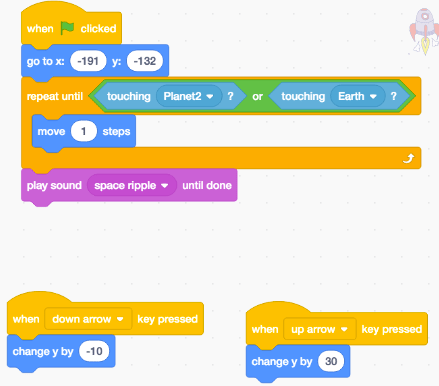
Video games in Education has been prevalent in school and has been increasing massively over the past ten years (Arnab, Berta, Earp, De Freitas, Popescu, Romero, & Usart. 2012). There are many different programs that allow for students to engage in games that may assist their learning in different ways either through the playing of games such as Mathletics which incorporates maths into a gaming atmosphere; or by creating the games through programs such as Scratch which gives students the opportunity to create something unique through the use of it many different features.

Scratch Game

Using video games in the classroom is a great way to bring 21st century skills into the class room and expose students to these vital skills that are imperative in navigating today’s environment. Games in education allow for students to flex their creativity muscle and allows them use a variety of different programs to create games for each other to play. A good platform for students to use that is free and widely accessible is Scratch. Scratch is an online platform that allows students to create different games through the use of the block code that is simple to understand. Scratch offers a range of different skins which are known as Sprites, these sprites can be used to create a wide variety of different environments and settings that students can code and manipulate to create their game. Scratch can be implemented in many different areas of study due to its versatility and by enabling students and encouraging them to create these landscapes creativity can be fostered as they are given such a large amount of customisation and play-ability for them to create exactly what they picture.

Through Scratches versatile and easy to understand block coding system students can play around with different commands and blocks to make their environment as free flowing as possible there are limitless possibilities and students are only limited by their lack of experience with the program and are rewarded for experimenting with different block commands.

The use of Scratch in the classroom is a great way to foster creativity in students as it gives students the ability to create and share with the class. Furthermore other games in class encourages students to engage with the content and also creates a fun classroom culture.

References

Arnab, S., Berta, R., Earp, J., De Freitas, S., Popescu, M., Romero, M., & Usart, M. (2012). Framing the adoption of serious games in formal education. Electronic Journal of e- Learning, 10(2), pp.159-171. Retrieved from: https://files.eric.ed.gov/fulltext/EJ985419.pdf

Justification

Disclaimer: The website associated with this task has not been edited after the submission date.

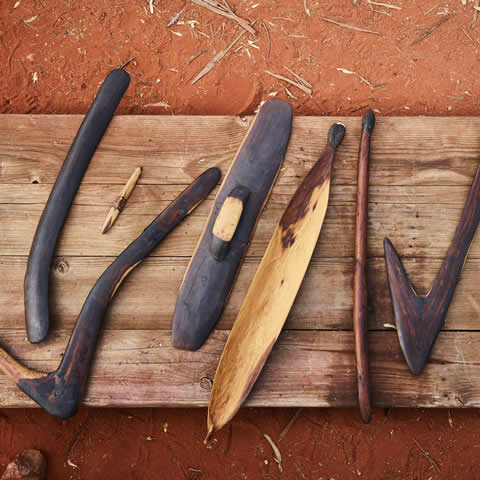
The Australian Indigenous tools and weapons research module is designed to foster student creativity and engagement with Australian history through the use of design-based learning. Researching, designing and 3D printing (using Tinkercad) of Indigenous tools/weapons facilitates learning as it promotes a conceptual understanding of the course material and the module. It allows students to apply creative thinking by designing their version of a tool/weapon based on the theory they have researched.

This module focuses on traditional and cultural tools and weapons of Indigenous Australians prior to the British settlement it has been designed to cover the ‘First Contacts’ unit in the Stage 2 (Years 3 and 4) syllabus (NESA, 2012) The syllabus outcome that is used for the creation of this module is HT2-5, which outlines that students are able to “apply skills of historical inquiry and communication” (NESA, 2012). Through their guided inquiry, students gain a deeper understanding and appreciation for the history of Australia and not just what is recorded in early British literature thereby giving a different perspective of Australian history from the eyes of Indigenous Australians.

The lessons are designed to engage the students in class and to promote and foster thorough historical inquiry into their lesson activity. Furthermore, this module is designed to maintain student engagement through the use of technology and designing the lessons around design-based learning which is the creation of a lesson or module where the teacher is using technology or other emerging teaching strategies and designing around that concept (Kalantzis & Cope, 2010). Lesson One revolves around the syllabus learning outcome of historical inquiry. This involves the students researching background information on different tools and weapons that were used by Indigenous Australians. The research is to be completed via a downloadable document that is available in the first lesson of the module and is to be re-uploaded to the link provided once it has been completed.

Lesson Two provides the students with the opportunity to convert their inquiry and knowledge gained into a design of a tool and weapon by exploring the use of 3D design and printing via the online platform Tinkercad. Tinkercad is an online program that allows young students to gain an understanding of how Computer Aided Design (CAD) works. For this to work, however, the teacher must have a sound understanding on how Tinkercad works so that they are able to assist students in designing their indigenous weapon (Koehler & Mishra 2005). The use of Tinkercad is for students to hone their creativity and technological ability skills in creating an indigenous artefact on a 3D planeBy implementing Tinkercad into this lesson it changes the way students feel about learning and transforms learning in schools (Yelland, Cope, & Kalantzis, 2008).

Lesson Three gives the students the opportunity to further experiment with other forms of technology that allows them to present what they have learnt to the class. By using a variety of different platforms, students are able to creatively express the information that they have learnt over the past two lessons. By allowing students to be able to use technology in the class room it refers to Yelland, Cope & Kalanzis (2008) whom illustrate the importance of using technology in the classroom to show different learning and teaching techniques that encourage creativity.

References

Kalantzis, M., Cope, B. (2010). The Teacher as Designer: Pedagogy in the new media age. E-Learning and Digital Media, 7(3), 200-222

Koehler, M. J., Mishra, P. (2005). Teachers learning technology by design. Journal of Computing in Teacher Education, 21(3), 94-102.

Neville, M. (2010). Meaning making using new media: Learning by design case studies. E-Learning and Digital Media, 7(3), 237-247

NESA (2012). NSW Syllabus for the Australian Curriculum. History K-10 Syllabus.

Yelland, N., Cope, B., Kalantzis, M. (2008). Learning by Design: creating pedagogical frameworks for knowledge building in the twenty-first century. Asia-Pacific Journal of Teacher Education, 36(3), 197–213

Lesson Three

In today’s lesson you will be creating a 3 minute presentation about the importance of your particular Indigenous tool/weapon. You will also be able to use your own 3D printed replica that you created last lesson as a visual aide.

Your presentation should answer these questions:

  • What is the name of your Tool/Weapon?
  • How big is the Tool/Weapon?
  • How was the Tool/Weapon created?
  • What was this Tool/Weapon used for?
  • Why is this Tool/Weapon important to Indigenous peoples?

You can use different presenting tool but I encourage you to do something creative! You can use any of the following:

If you have any others that you would like to use you can use them as well!!

Lesson Two

This lesson you will be using Tinkercad to create a replica of your chosen Indigenous Tool/Weapon. If you need a reminder on how Tinkercad works be sure to watch the video that gives good detail on how to use the different tools on offer. I can’t wait to see all of your designs! You will have all lesson to complete this design. Once you have finished upload your .STL file WITH YOUR NAME ON IT to the drive that is linked below so that they are ready to be handed out tomorrow.

.STL Folder for 3D Printing Link

If you run out of time you can finish it at home and send it to me BEFORE 6pm tonight.

Lesson One

For this lesson we will be exploring different traditional Tools and Weapons that were used by indigenous Australians. Attached below is a document that should be completed individually by the end of today’s lesson. I have also attached some links that will help with your research.

Once you have finished your research you are to then upload your amazing work to this Google folder: shorturl.at/dqDE4

Links to help with your research:

National Museum of Australia: https://www.nma.gov.au/explore/collection/highlights/north-west-nsw-aboriginal-artefacts

Aboriginal Culture: http://www.aboriginalculture.com.au/weapons.html

Earth Science Australia: http://earthsci.org/aboriginal/Ngadjonji%20History/food/weapons/Weapons%20and%20Tools.html

Australian Museum: https://australianmuseum.net.au/learn/cultures/atsi-collection/

If you finish your research early be sure to watch this very interesting video about different indigenous tools:

Virtual Reality in Education

Virtual Reality (VR) is the complete emersion of a person into a virtual world a place that is not normally accessible in a short amount of time such as travel to another country or moving into a completely different world. Virtual reality made a large impact in the computer game industry and slowly moving into education for the betterment of learning and creative thinking.

CoSpace is an online program that allows for the creation of a virtual world. CoSpace combines 360o photography and coding to create an environment that is unique with the use of different characters that are available. CoSpace can be used in conjunction with Google Cardboard or something similar in which a mobile device can slip in and you can experience the CoSpace environment with the full emersion of Virtual Reality. The use of CoSpace allows for children to get creative with VR and can be utilised in different lessons for example HSIE or Science to explore different areas of the world or different planets giving students the ability to explore have a proper feeling of their virtual surroundings thereby facilitate experiential learning that would otherwise be impossible (Southgate, 2018).

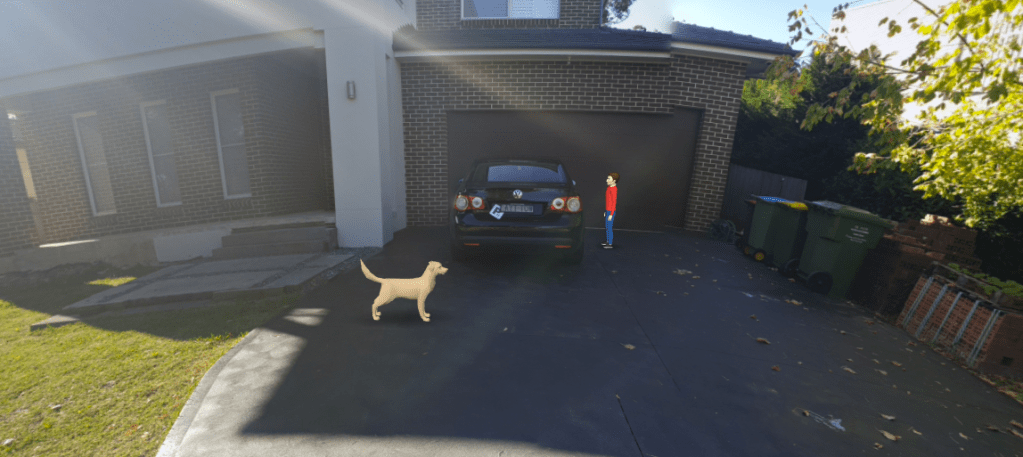
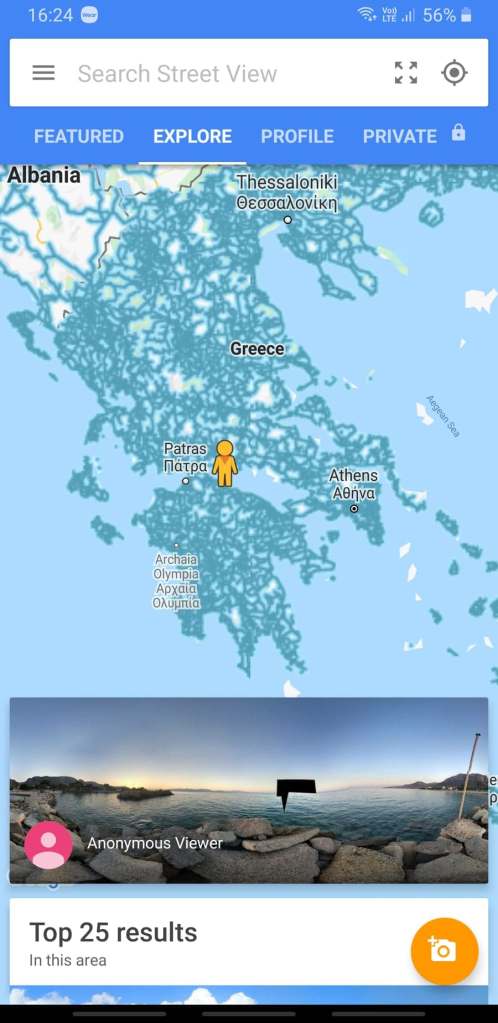
Google Street view is another technology that can be integrated into the classroom that can be utilised by virtual reality. Google street view allows for users to travel anywhere in the world and by using Google street view with virtual reality it gives a sense of scale as if the user is driving past a particular place in a bubble (Southgate, 2018). Furthermore the utilisation of Google Street view it allows for excursions to be had in challenging times such as right now with the Covid-19 pandemic in which recreation and educational travel is highly restricted using virtual reality can be a great alternative for students to explore the world and thus foster creativity in a variety of subjects.

The use of Virtual Reality in the classroom is a way to foster creativity within students and allows them to create and explore different worlds and different parts of our own world, particularly in these challenging times. By allowing for the integration of VR in the classroom it allows for different views and understandings of the world around us (Southgate, 2018).

Southgate, E. (2018). Immersive virtual reality, children and school education: A literature reviewfor teachers. DICE Report Series Number 6. Newcastle: DICE Research. Retrievedfrom http://dice.newcastle.edu.au/DRS_6_2018.pdf

Augmented Reality in Education

Using Augmented Reality in the classroom allows for students to be able to visualise and understand how something may fit in that particular environment or setting and even create their own environment with a variety of different applications that are available online and also on many smart devices. The use of Augmented reality allows for students express their creativity by creating various things for the use of augmented reality and it also helps students learning as different applications and specifically made educational tools such as books integrate the use of augmented reality so that students are able to see models of objects and vehicles that would otherwise be unattainable or unrealistic to see in person.

Augmented reality is used in a classroom setting and helps students to engage in authentic explorations in the real world and it also allows for observation to be created that cannot easily be observed with the naked eye by displaying virtual elements alongside real objects (Prodromou, 2020). By implementing Augmented reality in everyday teaching activities it allows for students to be more motivated to participate more actively rather than just rote learning and thereby creates hybrid learning environments that combine digital technology with physical learning utensils henceforth fostering a creative learning space that brings out the creative nature in primary aged students (Prodromou, 2020).

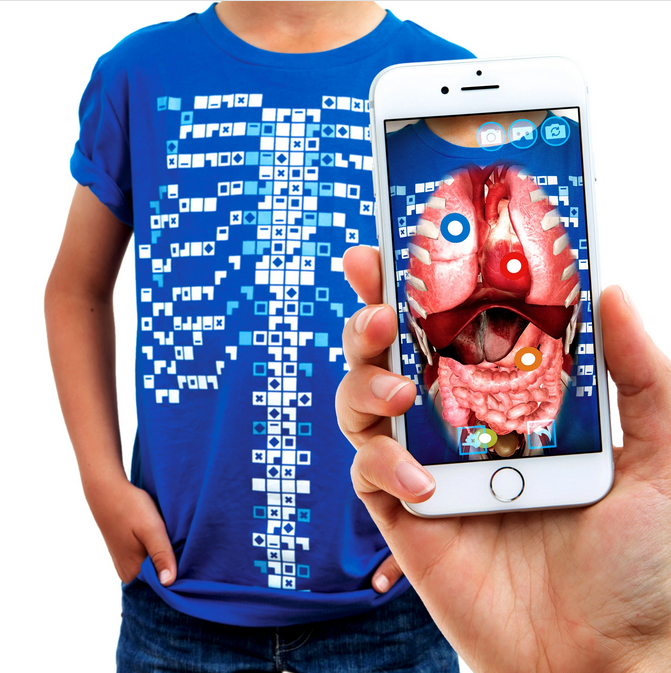
Augmented reality is used by Curiscope that developed the Virtuali-Tee. The Virtuali-Tee combines the use of technology and a t-shirt to demonstrate the anatomy of the human body. As seen in figure 1.1 it shows how the pattern on the Virtuali-Tee is similar to a QR code and can be read by the Virtuali-Tee app and allows for exploration of human anatomy, this provides a fun and interactive way for students to get involved in biology and understanding the human body furthermore, it allows for a more creative way for students to learn as they can explore particular arteries and organs within the Virtuali-Tee application. With the use of the Virtuali-Tee application they are also able to see the finer details of particular organs and arteries as well as systems of the body such as the nervous system. This allows students to have a deeper knowledge of the internal sytems of they human body and the level of interactivity that Virtuali-Tee allows is great for student engagement and fostering creativity in their work.

Figure 1.1

Prodromou, T. (2020) Augmented Reality in Educational Settings.

Online Learning with Zoom

Online learning has become very prominent over the past couple of months due to the covid-19 worldwide pandemic which has seen many businesses and educational institutions move to an online platform. With this move to online learning, conferencing platforms have become the new normality when it comes to teaching, therefore with this expansion of conferencing applications to the classroom it brings new challenges for students and teachers. These applications are not fostering creativity however by moving to an online platform it requires that children think outside the box when completing tasks and teachers are planning lessons as the lessons still need to be engaging.

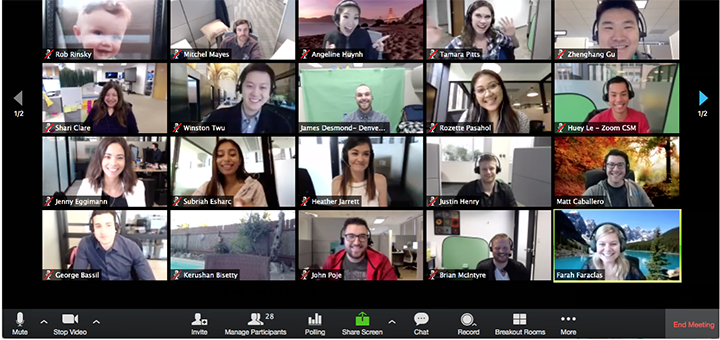
An application that has been favoured by educators is Zoom. Zoom is a conferencing app that allows up to 100 people to be hosted, this allows for maximum exposure (Zoom, 2020). As Zoom has been at the forefront of the move to online learning and video lessons all students and teachers have learnt to use its simplistic platform. Through Zoom’s simplistic platform it allows for students and teachers to interact together and in groups through zoom’s ‘breakout rooms’ which allows the teacher to split students into working groups. This feature is great to keep students engaged with their work and to keep them on task.

Advantages to using Zoom is that it allows for teachers to interacts with their class and it can be a very useful tool to use during this lockdown period, by using zoom it allows for teacher to communicate with their students and assign work that needs to be completed. However as aforementioned it does not allow for creative thinking but does allow for teachers to design and scaffold lessons that can foster creativity in students particularly in the way that they submit their work and the type of work they complete. By doing this it maintains students engagement not only with the Zoom lesson but also with the work associated with the lesson. According to Bonser (2020) it is important to be prepared and well organised for a Zoom lesson this includes having a working microphone that is high quality so students are able to understand, having multiple smart devices and camera angles if demonstrating a topic this gives the educator the opportunity to use a variety of sources to keep the students engaged. Bonser also states that not being able to see all students when teaching is a draw back as teacher are unable to catch students that may be falling behind or not paying attention.

Coding

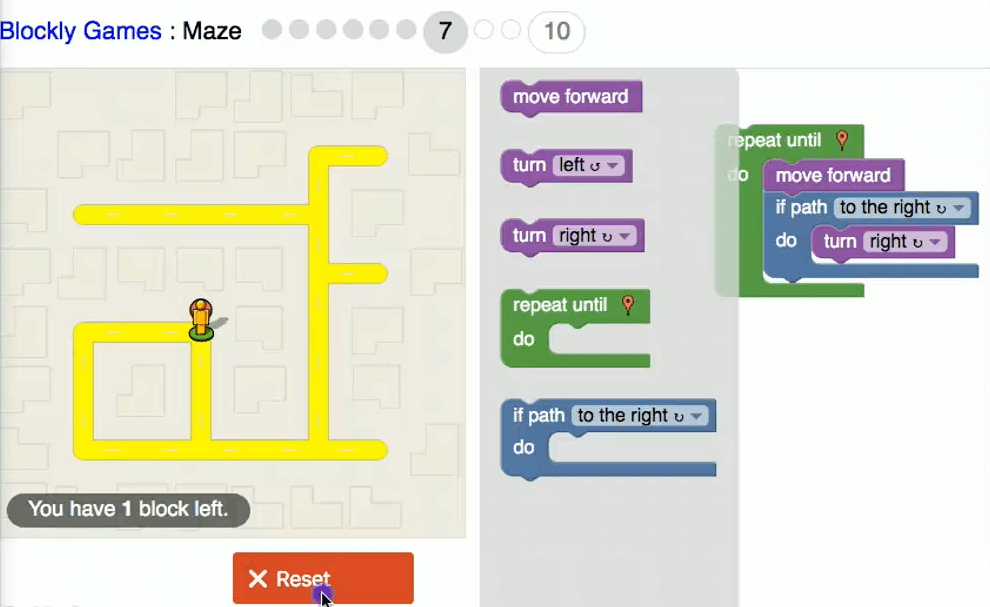
Figure 1.2: Blocky Maze Video

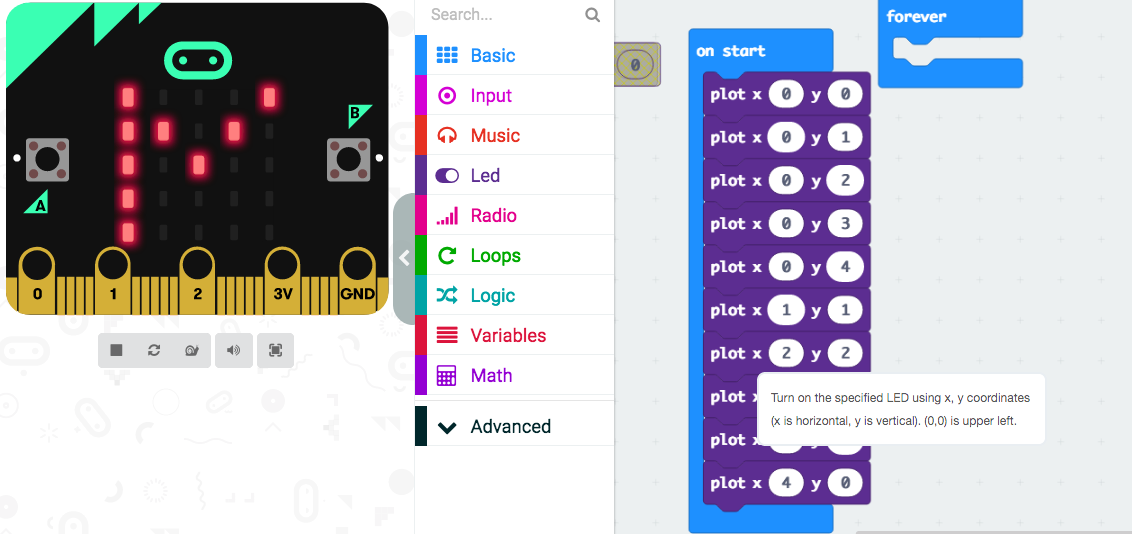
Coding is computer programming where a language has to be learnt and a level of computational thinking needs to be reached to understand how coding works (NESA, 2019). When coding in the class room is understood it can greatly benefit the students and foster great amounts of creativity that allows for greater computational thinking and understanding. There are many platforms that can be used in the classroom that allows for students to code and to create whatever the can imagine within the parameters of a particular program. Most coding platforms for primary aged students use block coding which is seen in figure 1.1 and allows for students to drag and drop instructions for the program to run. An example of this coding language is Microbit editor (figure 1.2) and Blocky game maze (figure 1.1).

Figure 1.2: Microbit

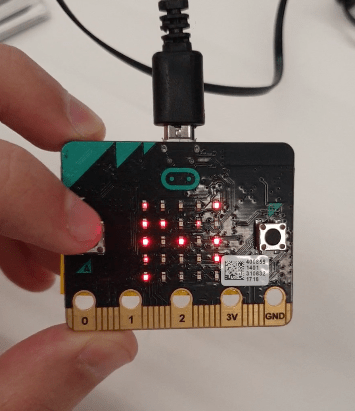
The use of coding in education relies heavily on constructionism as it is something that needs to be taught to students as they will need some understanding of how coding works and how it can do whatever its told to do through the block coding language that would be used for primary students. Once students are taught these programs and languages “it doesn’t take too long playing with some code to generate truly evocative images and visual experiences.” (Greenberg, 2007). By allowing students to play around with block coding in different programs it allows them to gain a grasp on what different actions do and how to recreate the multiple times and to make them simpler, this improving on their computational thinking and allowing them to be creative in the way that they code as evident in figure 1.1 and figure 1.3). Through the Blocky maze game it allowed students to improve on their block coding skills as each level of the game introduced different obstacles for the user to overcome and encourages creative coding to reach the end goal. The Microbit editor can be used with or without the Microbit computer, and this allows for versatility in the classroom as students can still get the full effect of the block code programming without any hardware as demonstrated in figure 1.2. Through the use of both these programs it allows for students to broaden their computational thinking and creativity as these programs encourage this type of thinking.

Figure 1.3: Microbit Demonstration Video

NSW Education Standard Authority. (2019) Retrieved from https://educationstandards.nsw.edu.au/wps/portal/nesa/k-10/learning-areas/technologies/coding-across-the-curriculum

Greenberg, I (2007) Processing: Creative Coding and Computational Art.

Design a site like this with WordPress.com
Get started