Creativity in education is important across all key learning areas and therefore being able to have limitless creative program such as Tinkercad. Tinkercad is a free online program that allows for students to design in cad (computer-aided design), create electronic circuits which allows students to experiment with different electronic devices. Tinkercad also has a platform for coding and this allows for students to use a variety of techniques that allow students to design something through coding. Tinkercad is a great example of how creativity can be fostered through the introduction of technology (Edwards, 2011) These three features allows for students to be creative and through the Tinkercad website it can be implemented in a variety of key learning areas. As Tinkercad is a computer aided design website it allows you to download your finished work and as long a it isn’t the electrical activities it will allow you to download files that will enable 3D printing as long as it accessible at your school, this can be a negative as well as not all schools may have the resources that this website requires.
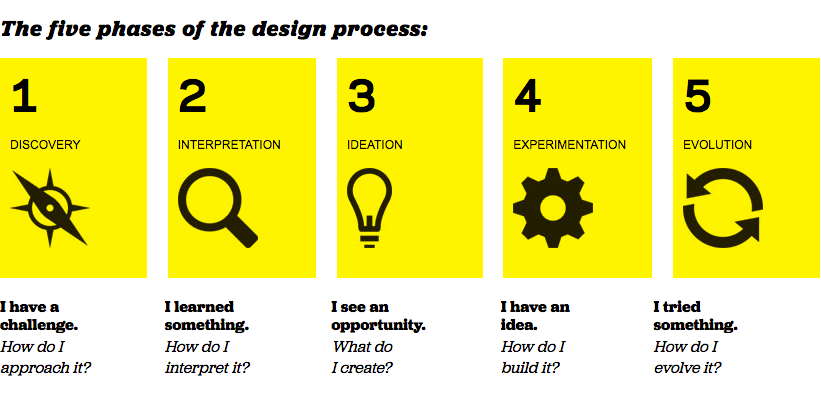
Tinkercad allows for creativity to be fostered as it gives students control over what they can create. With a variety of tools that are available within Tinkercad it allows for students to be as experimental as possible, and by not limiting their creative thinking they are able to adapt their work and be inspired by other students and other users on the site. The great thing about Tinkercad and designing on this site it that it allows for the students work to be 3D printed this way they are able to hold their own creation and be able to analyse their work and improve on it if needed. Through the use of Tinker cad it enables students to put design thinking into action and the steps involved in that as seen in figure 1.1.
However, there are some flaws in using Tinkercad in the classroom. These flaws can hinder the learning experience of the class and individual students. Tinkercad can be quite complicated and in order to understand how it works teachers will need preparation time to help the students understand the tools of Tinkercad. Furthermore, as it is a computer aided designing website it is important that the students have access to 3D printing to be able to experience Tinkercad to its full capabilities. In saying that however, using Tinkercad on its own still enables students to be creative and use their imagination as it has a 360 degree work area that allow students to tinker with their project.
 EDUC3620 Digital Creativity and Learning